

















Technology doesn’t solve problems; people and a well‑tuned process do. Marketo is no exception. It’s a powerful platform that enables you to execute your digital marketing strategy in a way that fits your organization – but only if you configure it intentionally and let automation do the heavy lifting.
I’ve yet to meet a Marketo customer who got everything right from day one. I’ve also been on the other side of that equation myself.
“My event platform doesn’t integrate with Marketo, so I’ll just upload engagement data through a list.”
“I’ll quickly fix that new record so it syncs to CRM without errors.”
That was how I got my start in Marketing Operations: manually connecting the dots. It worked – until it didn’t. As demand from the business grew, that approach simply didn’t scale. The only sustainable path forward was automation.
In this article, I’ll walk through five Marketo features that are often overlooked or underutilized. Used correctly, they can help you move from reactive execution to scalable, repeatable growth. For each feature, I’ll cover what it is, the primary use case, common pitfalls, and an expert tip to help you get more value out of it. Enjoy.
Dynamic Content
What it is
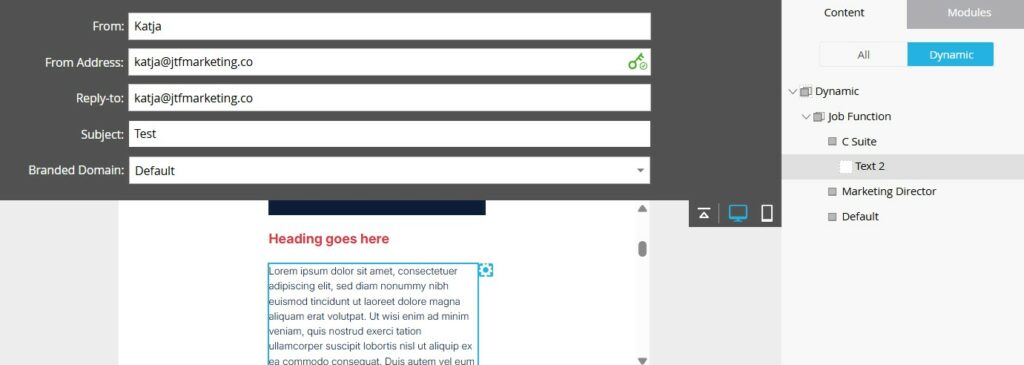
Dynamic content allows you to show different versions of the same email or landing page content to different audiences, without duplicating assets. Marketo uses segmentations to determine which version of the content a person sees at the moment the asset is sent.
Personalization at scale was always the promise of marketing automation, and dynamic content is where that promise becomes a reality.
Main use case
Dynamic content enables you to tailor messaging based on attributes such as industry, job role, region, language, or customer lifecycle stage – all within a single email or landing page.
A common example is a webinar invitation where the core message stays the same, but the supporting copy, value proposition, or call‑to‑action changes depending on the audience. Marketo continuously evaluates which segment a person belongs to, ensuring the most relevant content is displayed automatically.
Marketo supports up to 20 segmentations per instance, which is more than enough for most organizations if used thoughtfully.
Common pitfalls
- Too many segmentations: Creating segmentations ad hoc leads to overlap, confusion, and maintenance issues.
- No default content: Forgetting to define default content can result in blank sections for people who don’t match a segment.
- Segment sprawl: Segment logic that overlaps or isn’t mutually exclusive can cause unexpected results.
Expert tip
Dynamic content isn’t limited to text. Images can be dynamic too. Try applying dynamic content to your header image to immediately signal relevance before the reader even starts reading.

Download
Marketo Hacks for Campaign Performance
To help you go further, we’ve pulled together a practical guide packed with quick wins, configuration tips, and workflow shortcuts you can apply immediately. It’s designed for busy Marketing Ops teams who want impact without the complexity.
Velocity Script Tokens
What it is
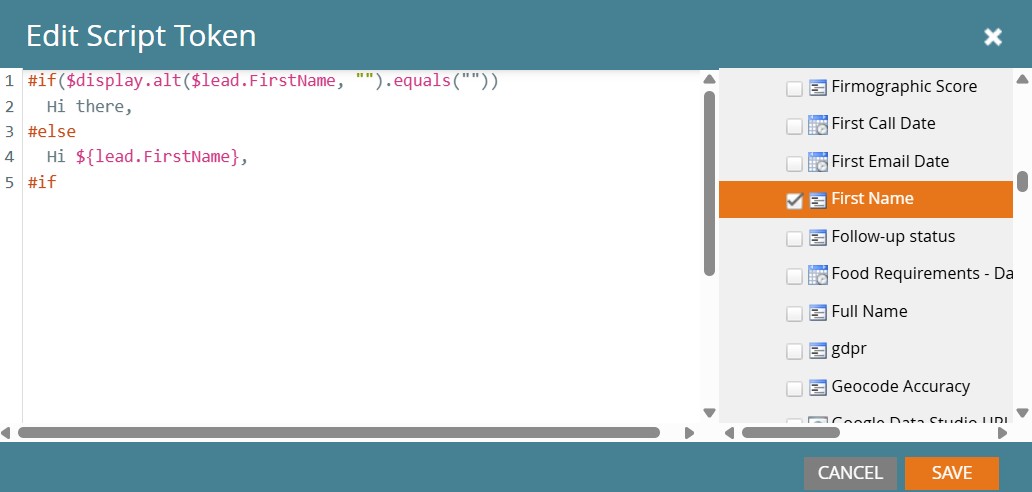
Velocity is a scripting language you can use within Marketo script tokens to generate highly personalized text or URLs. Script tokens can be referenced across emails and landing pages within a program, making them both powerful and reusable.
While dynamic content personalizes at the segment level, Velocity enables personalization at the individual level.
Main use case
Velocity scripts allow you to tailor content using nearly any data point in your Marketo instance, including custom objects. This opens the door to advanced use cases such as:
- Conditional logic based on multiple fields
- Smart fallbacks when data is missing
- Personalized URLs or content blocks generated on the fly
A great starter use case is improving email salutations. By checking values like gender, first name, and last name (and defining sensible fallbacks) you can avoid awkward openings caused by incomplete or inaccurate data.
Common pitfalls
- Forgetting to select fields: If you don’t explicitly select the fields used in your script from the token editor, the script won’t work.
- Overengineering: Complex scripts are harder to maintain and troubleshoot.
Expert tip
Start small. Write scripts that solve one clear problem, then reuse and refine them over time. A well‑written Velocity token can become a standard building block across many programs.
Program Member Custom Fields
What it is
Program Member Custom Fields store data about a person, but only in the context of a specific Marketo program. Much like program status, their values can differ from program to program.
This makes them ideal for campaign‑specific data that doesn’t belong in your global person schema.
Main use case
For years, Marketing Operations teams have been asked to add “just one more field” to the database – often to support a single campaign. Program Member Custom Fields solve this problem by allowing marketers to capture campaign‑specific information without bloating the core data model.
Examples include:
- Event‑specific answers
- Campaign‑level classifications
- Temporary tracking values
Common pitfalls
- Ignoring field limits: There is a cap on the number of Program Member Custom Fields available.
- Single‑purpose fields: Creating fields that can only be used once wastes valuable capacity.
- Poor naming conventions: Vague or inconsistent names make reuse difficult.
Expert tip
Design a small set of multi‑purpose Program Member Custom Fields that can be reused across campaigns. Use the Program Description to document how you are using the fields in a particular program. One particularly strong use case is storing campaign‑specific UTM values – preserving exactly which UTMs were captured for which program.

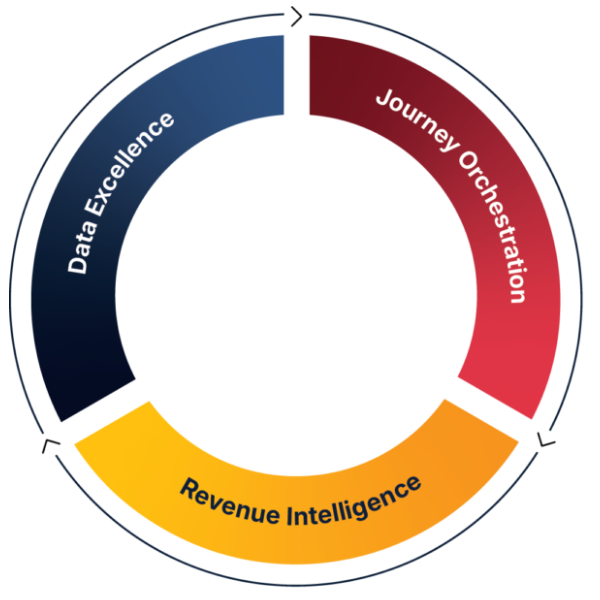
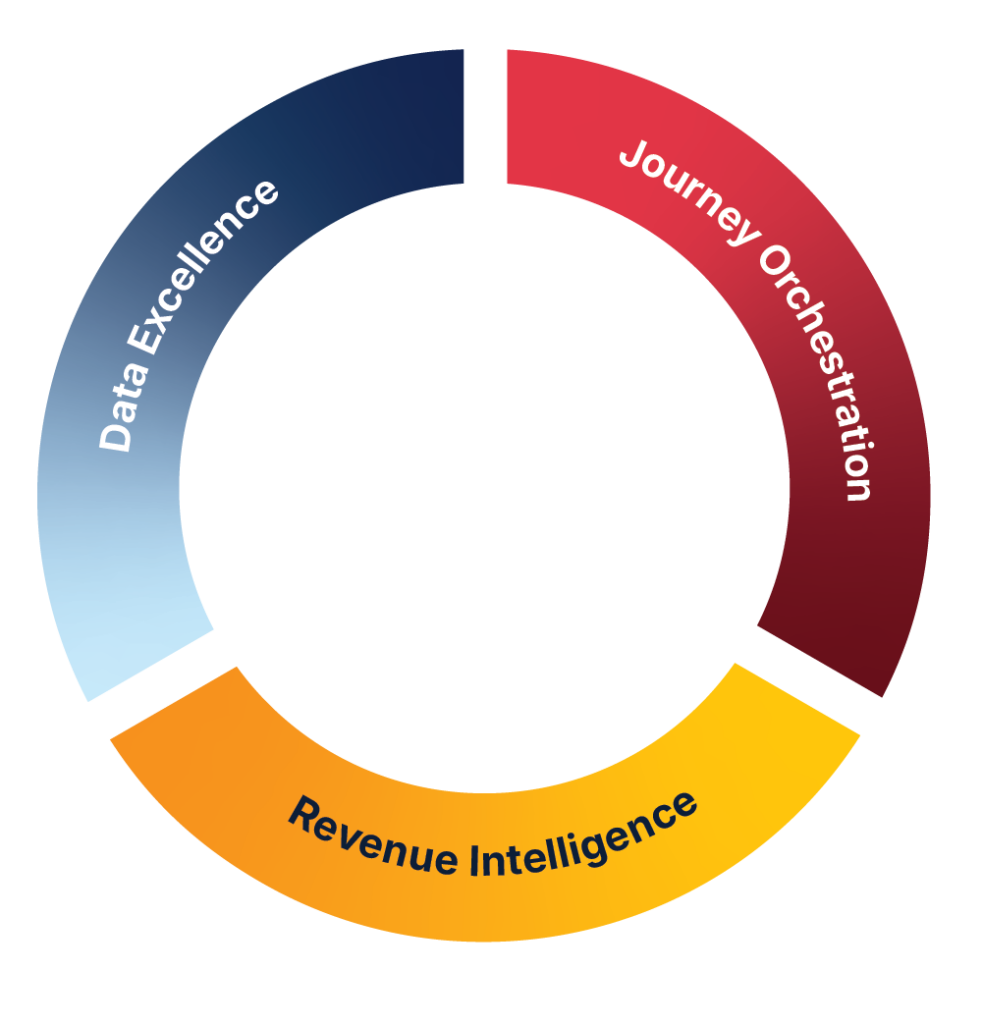
JTF Revenue Acceleration Loop
How This Fits Into JTF’s Revenue Acceleration Loop
Improving your Marketo setup isn’t just a technical exercise – it’s a revenue exercise. Every optimization you make feeds directly into the Revenue Acceleration Loop: better data → smarter activation → clearer insight → faster optimization.
The features in this article strengthen the loop at multiple points. Dynamic content and Velocity scripting sharpen activation by delivering more relevant experiences. Program Member Custom Fields and smart campaign orchestration improve data quality and operational consistency, which in turn strengthens attribution and insight.
Smart Campaign Orchestration
What it is
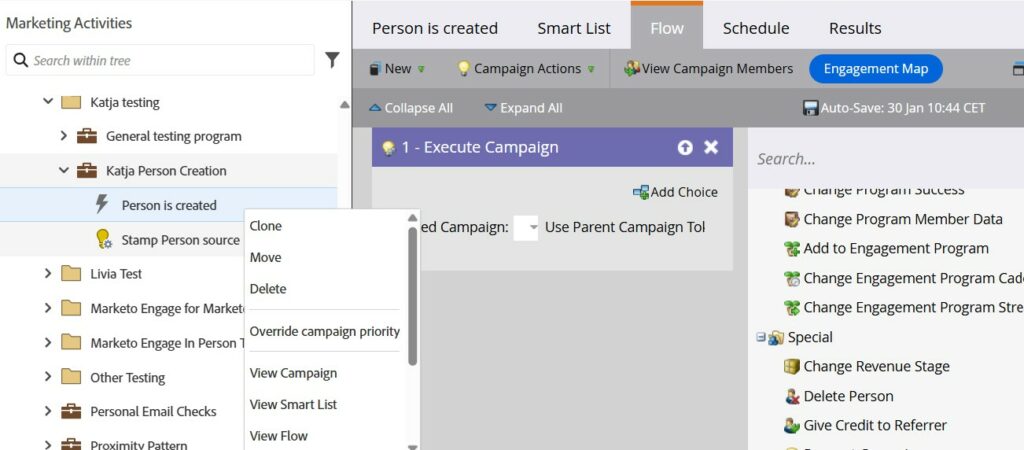
Smart campaign orchestration isn’t a single feature, it’s a pattern. It combines executable campaigns, campaign priority override, and asset expiration to create predictable, scalable automation flows.
Most teams use trigger and batch campaigns. Fewer teams take the next step and orchestrate them deliberately.
Main use case
Instead of creating dozens of trigger campaigns responding to the same event, you can:
- Build one central trigger campaign
- Use Execute Campaign flow steps to call supporting campaigns in sequence
- Control execution order using campaign priority override
- Automatically deactivate assets using asset expiration
Executable campaigns only run once the previous step completes, eliminating the need for fragile wait steps and improving reliability.
This pattern is especially critical for foundational processes such as what happens when a person first enters your database. Data governance depends on it.
Common pitfalls
- Overusing priority override: If everything is high priority, nothing is.
- Hidden dependencies: Poor documentation makes orchestration hard to maintain.
- Forgetting expiration: Old triggers and landing pages continuing to run long after a campaign ends.
Expert tip
Reserve campaign priority override for one or two truly critical processes. Treat your central trigger campaign as infrastructure, not just another campaign.
Performance Insights
What it is
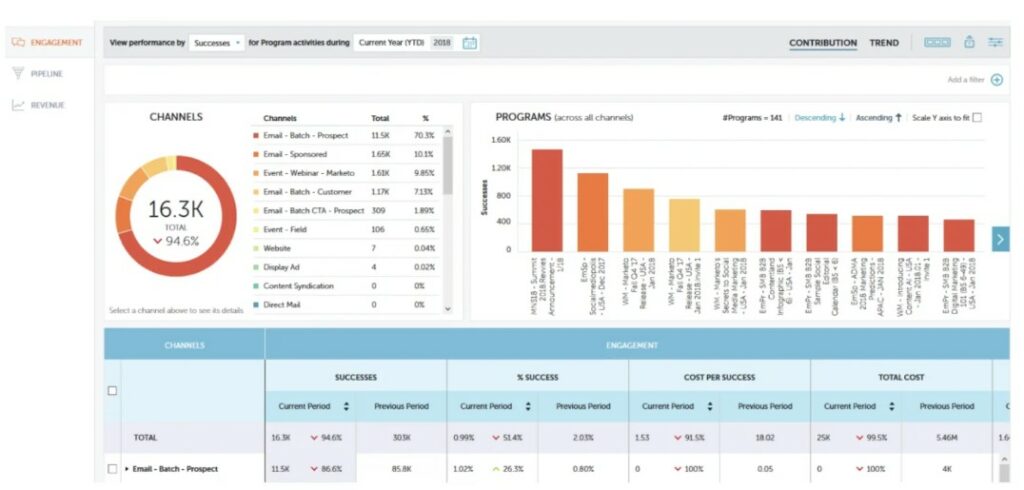
Performance Insights is Marketo’s built‑in multi‑touch attribution reporting, accessible directly from the My Marketo screen. While it doesn’t offer extensive customization, it provides a solid foundation for understanding marketing impact.
Main use case
Performance Insights is ideal for teams starting their attribution journey. It helps answer questions like:
- Which programs influence pipeline?
- How marketing touches contribute across the buyer journey
- Where investment is driving results
Understanding this model can also clarify whether, and why, you might need a more advanced attribution platform.
Common pitfalls
- Weak data foundations: Poor acquisition program setup or inconsistent program statuses undermine reporting.
- CRM misalignment: If people aren’t properly associated with opportunities, attribution breaks down.
- Ignoring program tags: Missing tags limit your ability to analyze performance by segment or business area.
Expert tip
Use program tags consistently. They unlock meaningful drill‑downs and make Performance Insights far more actionable.
Conclusion
Getting started with Marketo is about building solid fundamentals: clean program templates, simple campaigns, and reliable data flows. But real maturity comes from staying curious and continuously expanding how you use the platform.
These five features – dynamic content, Velocity scripting, program member custom fields, smart campaign orchestration, and Performance Insights – can help you move beyond basic execution and let Marketo work for you at scale.
Ready to take the training wheels off your Marketo instance? Whether you need a full instance audit, advanced team training, or hands‑on implementation support, JTF is here to help.
Connect with Katja on LinkedIn.
Frequently Asked Questions
This blog is written for Marketing Operations professionals, demand generation teams, and anyone responsible for building, maintaining, or scaling a Marketo instance. Whether you’re new to Marketo or looking to mature your operational framework, the concepts apply across all experience levels.
Not necessarily. Some features – like dynamic content or Velocity tokens – can be used by most marketers with standard permissions. Others, such as smart campaign orchestration or Program Member Custom Fields, typically require admin access or collaboration with your MOPs team.
Most of the features highlighted can be introduced gradually. Dynamic content and Velocity tokens can be implemented within a single campaign cycle. Orchestration patterns and Program Member Custom Fields take more planning but deliver long‑term scalability once in place.
Only if you retrofit them into active programs. In most cases, teams introduce these features into new templates or upcoming campaigns first, then gradually update older processes. This reduces risk and ensures smoother adoption.
Start where the pain is highest. If personalisation is inconsistent, begin with dynamic content. If data quality is the issue, focus on orchestration and Program Member Custom Fields. If leadership wants clearer reporting, Performance Insights is the fastest win.